Posts Subscribe to This BlogComments

Follow Us

New Articles

1 2 3 4 5
Photobucket Disini kalian dapat merequest Software, Game, Pembuatan gambar 3dimensi AUTOCAD dan ANIMASI 3DSMAX ataupun Share Solution of Computer

Selasa, 15 November 2011

The Elder Scrolls V Skyrim (2011) PC Game [Mediafire]


Minimum System Requirements
* OS: 7/Vista/XP PC (32 or 64 bit)
* CPU: Dual Core 2.0GHz or equivalent processor
* RAM: 2 GB
* HDD: 6 GB
* Graphics: 512 MB card
* Sound Card: DirectX 9 Compatible
* DirectX: Version 9.0c


Description:
The Empire of Tamriel is on the edge. The High King of Skyrim has been murdered. Alliances form as claims to the throne are made. In the midst of this conflict, a far more dangerous, ancient evil is awakened. Dragons, long lost to the passages of the Elder Scrolls, have returned to Tamriel. The future of Skyrim, even the Empire itself, hangs in the balance as they wait for the prophesized Dragonborn to come; a hero born with the power of The Voice, and the only one who can stand amongst the dragons

Epic Fantasy Reborn. Skyrim reimagines the open-world fantasy epic, pushing the gameplay and technology of a virtual world to new heights.
Live another life, in another world. Play any type of character you can imagine, and do whatever you want; the legendary freedom of choice, storytelling, and adventure of The Elder Scrolls is realized like never before.
All new graphics and gameplay engine. Skyrim’s new game engine brings to life a complete virtual world with rolling clouds, rugged mountains, bustling cities, lush fields, and ancient dungeons.
You are what you play. Choose from hundreds of weapons, spells, and abilities. The new character system allows you to play any way you want and define yourself through your actions.
Dragons return. Battle ancient dragons like you’ve never seen. As Dragonborn, learn their secrets and harness their power for yourself.


LA Noire (2011)LA Noire (2011)LA Noire (2011)LA Noire (2011)LA Noire (2011)


Mediafire Download Links-
size: 5.1 gb

Mediafire Password-world4free.in

Cramit Download Links-

size: 5.1 gb

Read More...

Kamis, 10 November 2011

Program pengacak no undian pada VB 6


Undian itu salah satu hal yang paling digemari masyarakat… Undian ada berbagai macam….ada yang melalui media elektronik dan salah satu aplikasi yang bisa digunakan untuk membuat undian adalah Visual basic 6.0 …Simak cara singkatnya di bawah ni…

1. Buka aplikasi Visual basic dengan cara klik start-program-microsoft visual studio 6.0-microsoft visual basic 6.0


2. maka akan muncul tampilan sbb:

pilih standart exe untuk memulai membuat aplikasi baru

dan klik open untuk memulai membuat aplikasi.
3. setelah anda klik open, maka akan muncul tampilan form seperti dibawah ini :
4. Buat label dengan cara klik Label pada toolbox lalu ganti namanya melalui caption.
5. lakukan hal yang sama namun ganti caption dengan NO handphone
6. Lalu klik pada text box dan hapus tulisan “text” pada properties. dan tambahkan 1 text box lagi dibawahnya.
7. Setelah selesai menambahkan textbox, lalu tambahkan command button seperti gambar dibawah ini, dan ubah caption pada properti menjadi Acak, setelah itu tambahkan 1 command button lagi dan ganti captionnya menjadi stop.
8. Lalu kita tambahkan timer dengan cara klik timer yang ada di toolbox


9. Lalu kita akan memasukkan komponenen adodc dan datagirid.

Sebelumnya kita arahkan kursor ke toolbar dan pilih project, lalu klik component.
10. setelah kita klik akan muncul component box, lalu kita beri tanda check pada Microsoft ADO Data Control 6.0 (SP6) dan Microsoft DataGrid Control 6.0(Sp6) dan pilih apply lalu Ok.
11. Setelah itu kita pilih adodc yang ada di toolbox
12. Setelah kita pilih adodc, kita pilih datagrid yang ada di toolbox


13. Setelah kita menambahkan komponen yang diperlukan, lalu kita buat database di Microsoft Access,

dengan cara kita klik start-program-microsoft office-microsoft access 2003
14. untuk membuat database baru, kita klik File-New
15. Lalu klik blank database
16. Lalu kita simpan dahulu database yang akan kita buat, ke folder yang diinginkan.
17. lalu klik kanan pada create table in design view, dan pilih design view
18. lalu kita isi field name dan data typenya
19. lalu kita ubah nama tabelnya dengan menyimpan ulang
20. Klik ganda pada database untuk mulai mengisinya


21. Setelah kita membuat database di access, lalu kita kembali pada Visual Basic 6.0, lalu kita mengkoneksikan adodc nya dengan cara,

1. Klik pada Connection string

2. Klik build properties page

3. lalu kita pilih Microsoft Jet 4.0

4. Lalu kita klik next


22. Setelah klik next maka akan muncul Data Link Properties, pada Data Link Properties,Klik

1. pada Select or enter database name pilih folder tempat penyimpanannya

2. Pilih nama databasenya

3. Klik open

4. Lalu klik Test Connection, Jika Berhasil maka akan muncul Test Connection Succeeded
23. di Properties pages pada Record Source isikan tampilan seperti gambar di bawah ini, lalu klik apply dan Ok
24. Pada Properties datagrid, kita ubah koneksi data source dengan adodc1
25.Klik ganda pada command “Acak” lalu isikan script sbb :
26. Klik ganda pada timer lalu ketik script sbb:
27. Klik ganda pada command “Stop” lalu ketik script sbb:


Jangan lupa, pada properti text boxnya, Pilih data source dengan adodc1. dan datafield sesuai dengan nama fieldnya.

- Jika anda ingin tampilan adodc dan datagrid tidak terlihat waktu dijalankan,, pada properties visible,,nilainya kita ganti dengan false.

Untuk menjalankan kita klik tombol Run pada Vb atau tekan F5 pada keyboard.

dan inilah tampilannya


Untuk mendownload Contoh programnya kalian bisa download disini 

Read More...

Call of Duty : Modern Warfare 3 (2011) PC Game


Minimum System Requirement
CPU: Intel® Core™ 2 Duo E6600 or AMD Phenom™ X3 8750 processor or better
RAM: 2GB RAM
VGA: Shader 3.0 or better 256 MB NVIDIA®GeForce™ 8600GT / ATI® Radeon™ X1950 or better
DX: DirectX® 9.0C or later
OS: Windows® XP / Windows Vista® / Windows® 7
HDD: 16 GB free hard drive space.
DOWNLOAD LINK
Crack Only + Fix -RELOADED

Download via 1.5gb Resumable Parts
DVD1
Download via Resumable Parts 200MB Parts
Password: worldfree4u.com 

2nd Password:awesome

Read More...

Ignite (2011) PC Game [Mediafire]


Description:
Every race is different in Ignite. Each race brings something new as players try to win by using their own tactics. The score system in Ignite allows for tactics to be used during a race. Gathering score allows the use of nitro in the race and converts to time bonus at the end. So short term usage of nitro can help the players get out of situations ahead of the others but using a lot of nitro and thus score may cost him the game. There are different methods of gathering score (drafting, hitting objects, drifting) and some cars are more suited for a method then the other. Choosing the right car for the preferred method and playing out your strategy will make the player win the game.

Features:
Single and multiplayer game: a 35 races long single player campaign played at 7 locations. Multiplayer game up to 5 players.
3 modes of game play: Race mode — A new twist to the racing genre: Players can gather score and burn it away to get ahead or collect score and jump to the front at the end of the race when it is converted into time bonus. Knock-Out mode — At the end of each lap, the last player gets knocked out of the race. Those who remain, get a score bonus. Run-Out mode — Players start with a set amount of score, but it is gradually running out. Players may replenish some of their score with stunts or burn some of it away as nitro but if their score runs down to zero they lose the game.

3 different types of racing cars: The American muscle, the street and the race cars all have a certain feel which requires different driving technique.
Various configuration for each car: All vehicles have different settings which makes them suitable for different races or driving styles.
30 Achievements: A full achievement system to award stunts and special skills and also to teach some of the techniques in the game.
Leaderboard: A worldwide leaderboard for each racetrack.
Car damage: cars get damaged which does not influence the handling.
Random atmospheres: From sunshiny, to fogy the same racetrack may have a very different feel in two races.
Minimum System Requirements:
CPU: Intel® Pentium IV 3.0 Ghz
RAM: 256 MB RAM (Recommended: 512 MB RAM)
VGA: DirectX® 9.0c Compatible video card with minimum 512MB memory
DX: DirectX® 9.0c or above
OS: Windows® XP, Vista, or Windows 7
HDD: 950MB
Sound: DirectX® 9.0c Compatible sound card.

Ignite (2011)Ignite (2011)Ignite (2011)Ignite (2011)Ignite (2011)


Mediafire Download Links-
size: 576 mb

Mediafire Password-
world4free.in

Cramit Single Link-
Download Now
size: 576 mb

Read More...

Senin, 07 November 2011

duplikat gambar dengan visual basic


Ini merupakan salah satu contoh program..dimana kita dapat menduplikasikan gambar .......
source code :
Private Sub Form_Load()
  Dim i As Integer

  For i = 1 To 10
    Load Image1(i + 1)
    Image1(i + 1).Visible = True
  Next i
  Randomize
End Sub

Private Sub Timer1_Timer()
  Dim i As Integer
  
  For i = 1 To 11
    Image1(i).Move Image1(i).Left + ScaleWidth * (Rnd - 0.5) / 30, Image1(i).Top + ScaleHeight * (Rnd - 0.5) / 30
  Next
End Sub

kalian bisa download contoh programnya disini

Read More...

Efek Tetesan Air Diatas Monitor dengan visual basic

Pada tulisan kali ini penulis ingin berbagi/share sedikit tutorial pemrograman, Tutorial ini tentang sebuah aplikasi yang dibuat dengan menggunakan Visual Basic 6.0 yaitu efek tetesan air di monitor, Sehingga monitor kompi kita nantinya tampak menjadi lebih hidup dan berwarna. . .hahaha, Mungkin tutorial ini masih sederhana sehingga masih dapat dikembangkan lagi. Oke langsung aja deh, Let's Cekidot...

- Pertama-tama buka project baru dan buat sebuah form
- Lalu masukan timer kedalam form dengan enabled = true dan interval = 1
- Next, Isikan coding berikut pada form dan jalankan

Option Explicit
Private Declare Function GetWindowDC Lib "user32" (ByVal hwnd As Long) As Long
Private Declare Function GetDesktopWindow Lib "user32" () As Long
Private Declare Function CreateCompatibleBitmap Lib "gdi32" (ByVal hdc As Long, ByVal nWidth As Long, ByVal nHeight As Long) As Long
Private Declare Function CreateCompatibleDC Lib "gdi32" (ByVal hdc As Long) As Long
Private Declare Function SelectObject Lib "gdi32" (ByVal hdc As Long, ByVal hObject As Long) As Long
Private Declare Function BitBlt Lib "gdi32" (ByVal hDestDC As Long, ByVal x As Long, ByVal y As Long, ByVal nWidth As Long, ByVal nHeight As Long, ByVal hSrcDC As Long, ByVal xSrc As Long, ByVal ySrc As Long, ByVal dwRop As Long) As Long
Private Const SRCCOPY = &HCC0020 ' (DWORD) dest = source
Dim x As Integer, y As Integer
Dim Buffer As Long, hBitmap As Long, Desktop As Long, hScreen As Long, ScreenBuffer As Long

Private Sub Form_KeyDown(KeyCode As Integer, Shift As Integer)
If KeyCode = vbKeyEscape Then
Unload Me
End If
End Sub

Private Sub Form_Load()
Desktop = GetWindowDC(GetDesktopWindow())
hBitmap = CreateCompatibleDC(Desktop)
hScreen = CreateCompatibleDC(Desktop)
Buffer = CreateCompatibleBitmap(Desktop, 32, 32)
ScreenBuffer = CreateCompatibleBitmap(Desktop, Screen.Width / 15, Screen.Height / 15)
SelectObject hBitmap, Buffer
SelectObject hScreen, ScreenBuffer
BitBlt hScreen, 0, 0, Screen.Width / 15, Screen.Height / 15, Desktop, 0, 0, SRCCOPY
End Sub

Private Sub Form_Unload(Cancel As Integer)
BitBlt Desktop, 0, 0, Screen.Width / 15, Screen.Height / 15, hScreen, 0, 0, SRCCOPY
End Sub

Private Sub timer1_Timer()
y = (Screen.Height / 15) * Rnd
x = (Screen.Width / 15) * Rnd
BitBlt hBitmap, 0, 0, 32, 32, Desktop, x, y, SRCCOPY
BitBlt Desktop, x + (3 - 6 * Rnd), y + (2 - 4 * Rnd), 32, 32, hBitmap, 0, 0, SRCCOPY
End Sub

Kalian bisa download contoh programnya disini

source http://stephanusvincent.blogspot.com/
Read More...

Explode form visual basic

ini salah satu design dalam membuat form.....
dimana disini saya akan memberikan suatu effect ketika membuka suatu program tersebut.....

SOurce code nya.

Private Sub Explode(ByRef frm As Form, ByRef efek As Boolean)
  With frm
    .Width = 0
    .Height = 0
    .Show
    
    If efek Then
      For x = 0 To 10000 Step 50
        .Move (Screen.Width - .Width) / 2, (Screen.Height - .Height) / 2, x, x
        DoEvents
      Next
    Else
      For x = 10000 To 0 Step -50
        .Move (Screen.Width - .Width) / 2, (Screen.Height - .Height) / 2, x, x
        DoEvents
      Next
      End
    End If
  End With
End Sub

Private Sub Form_Load()
  Explode Me, 1
End Sub

Private Sub Form_Unload(Cancel As Integer)
  Cancel = 1: Explode Me, 0
End Sub


 Atau kalian bisa download contoh programnya disini
Read More...

Selasa, 01 November 2011

Software Untuk Mengubah Teks Hasil Scan Menjadi Teks yang Bisa di Edit


Yang lagi bikin skripsi atau tesis , saya harap artikel ini bisa membatu. oke langsung saja ke TKP, jika anda punya refrensi berupa buku atau eBook yang berupa file Image (JPEG, BMP, GIF, dll), sedangkan anda butuh mengambil refrensi itu menjadi karakter teks yang bisa di edit di Microsoft Word atawa Open Office, anda tidak perlu mengetiknya kembali sampai-sampai anda kehabisan waktu hanya untuk menyalin, padahal deadline sudah menunggu.

Misalnya kita dapat referensi sebuah buku, daripada kita harus ketik perhalaman dan mengetiknya kembali, mengapa kita tidak scan aja tulisan di buku tersebut menggunakan scanner kemudian kita ubah hasil scan-nan tersebut mejadi teks untuk kita edit di aplikasi Ms. Word, bukankah lebih praktis dan efisien!

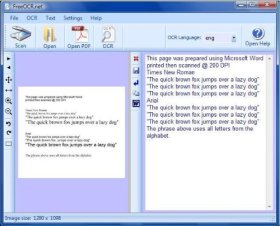
OK, biar yang kita gunakan gratis dan halal ^_^, kali ini kita akan gunakan yang freeOCR.

Sayangnya kekurangan dari freeOCR ini yaitu hasil konversinya akan sedikit kacau jika image atau gambar Anda kurang jelas tulisannya, sehingga ketika proses konversi selesai Anda harus memeriksanya lagi untuk mengkoreksi bagian-bagian yang salah. Nah, agar hasil konversi maksimal sebaiknya resolusi image waktu sahabat SCAN bukunya set resolusinya pada 200 Dpi.

Kelemahan lain dari aplikasi freeOCR adalah hasil konversi yang kacau ketika digunakan untuk meng-konvert image teks berformat kolom, sehingga aplikasi ini nggak cocok buat mengkonvert scan-nan koran.

Cara menggunakan Aplikasi FreeOCR ini sangat mudah, klik File/Open kemudian cari file yang ingin kita ubah ( biasanya dalam bentuk JPG) dan edit menjadi teks, kemudian klik menu OCR/Start OCR Process maka proses konversi akan segera dilakukan. Setelah itu simpan atau copy-paste hasil konversi tersebut ke Ms.Word.
Ingat, sebelum menjalankan/Meng-install free ORC, FreeOCR butuh .NET Framework versi 2.0 kalo blm punya silahkan download “DISINI” terlebih dahulu.
Jika anda tertarik menggunakan Software OCR ini, silahkan download gratis “DISINI“.
Terima Kasih, Semoga TA dan Thesis Sahabat sekalian lancar.. hehehe ^_^

Read More...